Leave Management
Manage employee leave requests — annual leave, unpaid leave, AP (holiday compensation) leave, and other leave types. Sick leave is handled separately (see Sick Leave).
:::tip Leave or availability? Leave requests are for longer time off, such as a vacation or unpaid leave, and need approval. If an employee just can't work on a recurring weekday or on a single day, they should add an availability entry instead — see Employee Availability. The leave form shows a gentle reminder when someone enters a single-day request, but it can still be submitted. :::
Leave Types
| Type | Description |
|---|---|
| Annual Leave | Paid annual leave (vuosiloma) |
| Unpaid Leave | Unpaid leave of absence |
| Holiday Compensation | AP days (arkipyhäkorvaus) — requires 6+ months of employment |
| Other | Other leave types |
Viewing Requests
Navigate to Leave. Requests are split into Upcoming and Past tabs (by end date), and you can filter by:
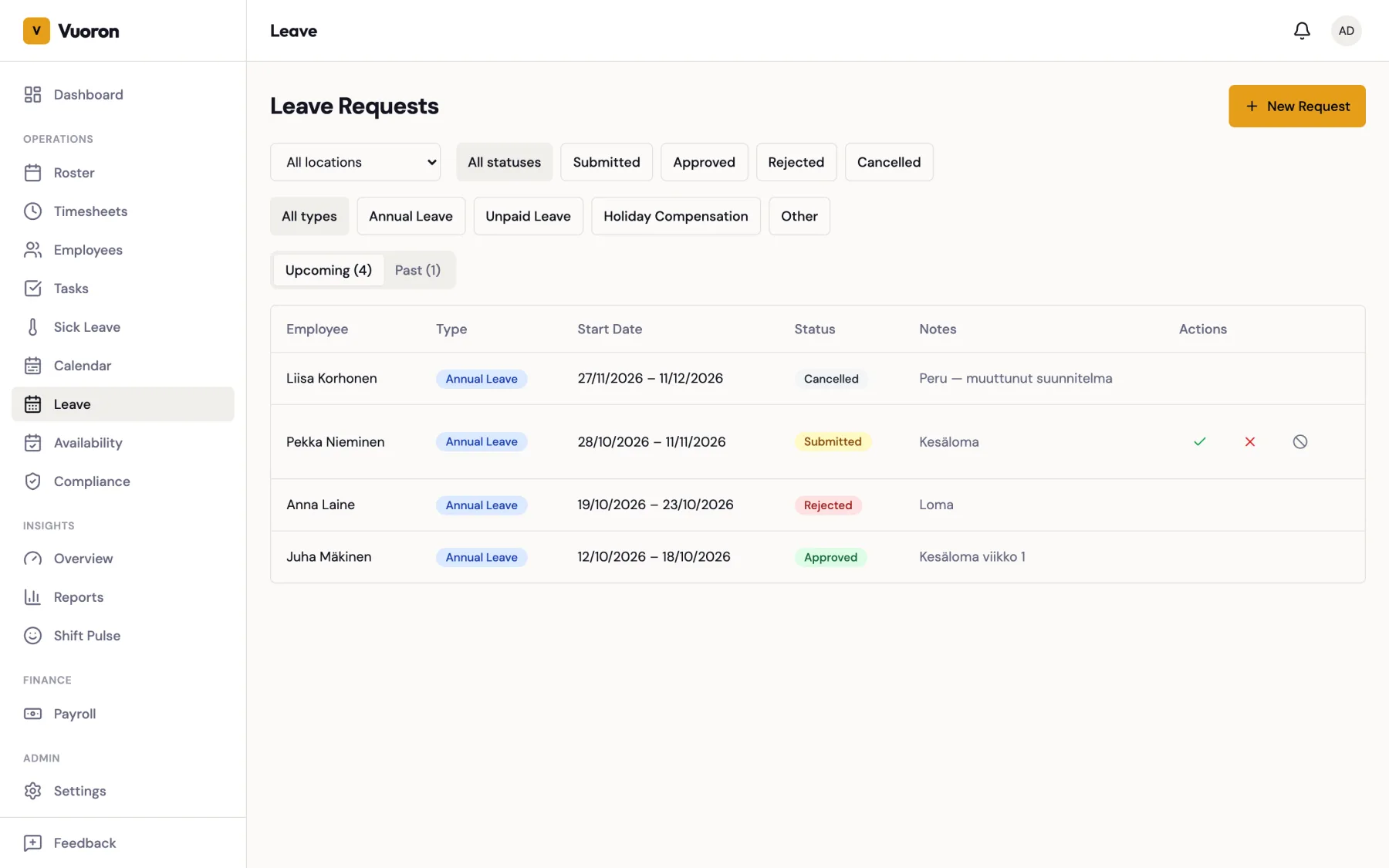
- Location — show only requests from employees assigned to one location. Hidden if you only have access to one location.
- Status — Submitted, Approved, Rejected, or Cancelled
- Type — Annual Leave, Unpaid Leave, Holiday Compensation, or Other
Supervisors and Managers see requests only for employees at their own location(s). Company Admins see all requests. Accounting users see every request in a read-only list (no approve, reject, or create controls). Employees see only their own requests.
Click a request to open its details, including the dates, number of days, notes, and who made the decision — the approver, the person who rejected it, or the person who cancelled it, with the date.
Creating a Request on Behalf of an Employee
Supervisors and above can enter a request for an employee (for example, one agreed in person):
- Click New Request.
- Select the Employee, the Type, the Start Date and End Date, and optional Notes.
- Click Save.
Approving or Rejecting Requests
- Find the request in the list (or open its details).
- Click Approve to confirm or Reject to deny, and confirm the prompt.
- The employee receives a notification of the decision.
Overlaps with a published roster
If the leave overlaps a roster that has already been published, the request can still be created and approved. Vuoro shows a warning — "Leave overlaps a published roster — remember to adjust the affected shifts." — and you should then update or reassign the employee's shifts on those days in the roster.
On the roster grid, approved leave is shown as an indigo leave marker on each day (pending requests as a lighter, dashed marker), and any shift already rostered on an approved leave day gets an Approved leave compliance warning as soon as you approve the request. See Compliance Warnings.
A request that overlaps another leave request of the same employee is still blocked, because that would be double-booked time off.
Request Status Flow
Submitted --> Approved --> Cancelled (by employee or supervisor)
         \-> Rejected
Approved requests can be cancelled by the employee or a supervisor.
AP Leave Balance
For AP leave requests, the system displays the employee's current balance:
| Field | Description |
|---|---|
| Accrued Days | Total AP days earned |
| Used Days | AP days already taken |
| Remaining Days | Available AP days |
AP leave accrual rules:
- AP days accrue based on hours worked: hours / 42 = AP days.
- Employees need 6+ months of continuous employment to be eligible (TES §6.9).
- July is excluded from accrual.
Notes
Employees can add notes to their leave requests. Supervisors can see these notes when reviewing requests.