My Hours
View your recorded working time week by week, and add hours you forgot to clock.
Viewing Hours
- Open My Hours from the menu (or the bottom bar on your phone).
- The current ISO week is shown (e.g. Wk 23). Use the arrows to move between weeks, or click Custom dates to pick any start and end date (Clear returns to the week view).
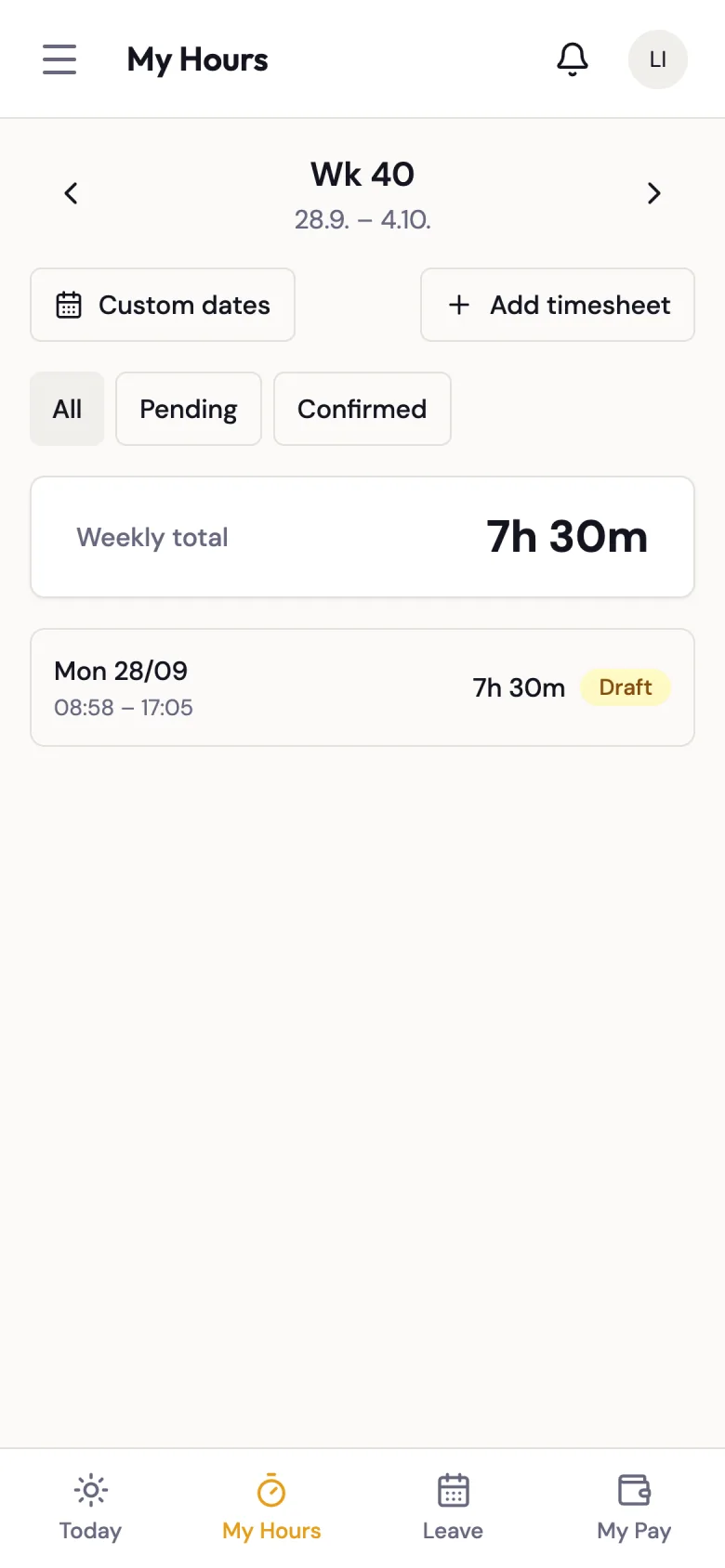
Each row is one worklog and shows:
- the date and your start and end times;
- the duration, after your employer's rounding rules (see Timesheet Rounding);
- an M badge if the entry was added manually rather than clocked;
- the status (see below).
The Weekly total card above the list adds up the durations of the rows currently shown.
Filtering
Use the buttons above the list to narrow it:
- All -- every worklog in the range.
- Pending -- entries still in Draft, not yet reviewed by your supervisor.
- Confirmed -- entries that have been approved, locked, or exported.
Worklog Details
Click a row to open Worklog Details: the actual start and end, rounded duration, location, and the Planned Shift it belongs to — planned start and end, break, and your manager's Shift note, if any. Entries without a shift show "No linked shift".
Adding a Forgotten Timesheet Entry
If you worked but forgot to clock in or out, you can add the hours yourself:
- Click Add timesheet. The New timesheet entry panel opens.
- Choose the Location (and department, if relevant).
- Enter the date, start time and end time. Use Add row to add several days at once. Dates can't be in the future.
- Optionally describe the work in Notes.
- Click Save timesheet.
Manual entries start in Draft status and are marked M. Your supervisor reviews them like any other hours.
If you made a mistake, you can Discard (bin icon) your own manual entry while it is still in Draft. Clocked entries and entries your supervisor has already approved can't be discarded — ask your supervisor to correct them.
Status Meanings
| Status | Meaning |
|---|---|
| Draft | Hours recorded but not yet reviewed by your supervisor. |
| Approved | Your supervisor has confirmed the hours are correct. |
| Locked | Hours are locked for payroll processing. No further changes can be made. |
| Exported | Hours have been sent to the payroll/accounting system. |
| Discarded | The entry was discarded and won't be paid. |
Discrepancies
If your recorded hours do not match what you expected, contact your supervisor. They can adjust worklog times on the timesheet.
If a clock-in or clock-out you made doesn't appear here at all, check your schedule for a red Some clock events couldn't be saved message — see Messages About Clock-Ins.