Booking Sources
Booking Sources connect an external booking system (for example, Planyo, Sessiq, or Johku) to Vuoro so upcoming reservations appear as a Bookings row on the roster grid. Supervisors use the feed as a staffing signal — it does not auto-create shifts.
Configuration lives under Settings > Booking Sources and is available to Company Admin only.
Source Maps
A source map tells Vuoro which internal location a given external site corresponds to. Each booking arrives with a source (e.g. planyo or sessiq) and an externalSiteId (e.g. 68900:Redi). If a matching map exists, the booking is attached to that location and shows up on the roster grid. If no map exists, the booking is stored but hidden from the grid until you add a mapping — a yellow banner on this page shows how many unmapped bookings are currently sitting in the queue.
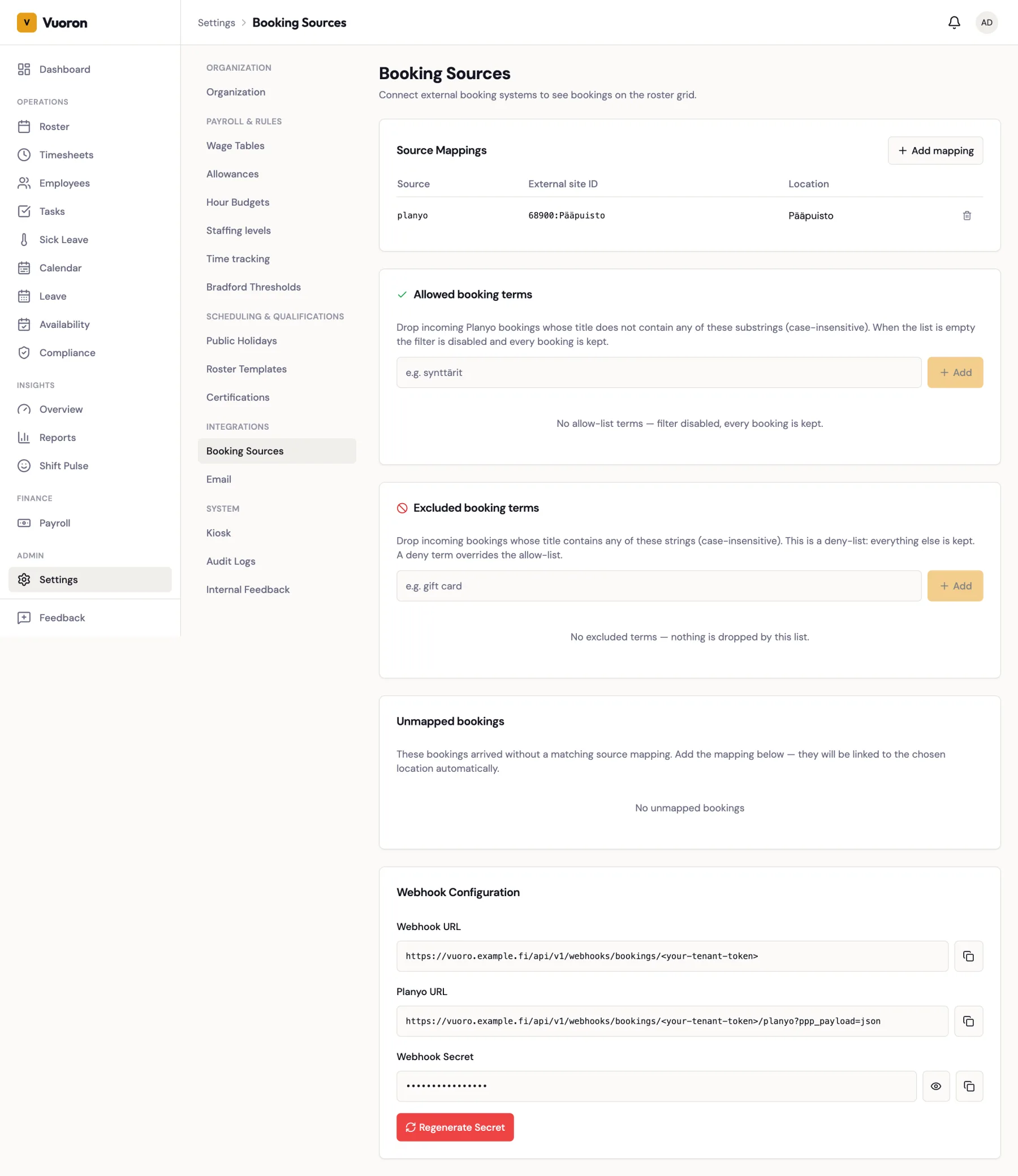
The External Site ID is matched case-insensitively, so 68900:redi and 68900:Redi resolve to the same map.
Each booking system uses its own source value, so you need a separate map per system even when two systems send bookings for the same location. For example, when moving a location from Planyo to Sessiq, add a sessiq map pointing at the same Vuoro location as the existing planyo map. Move one location at a time and stop the old system's feed for that location, so the same booking doesn't appear twice.
Add a source map
- Click Add mapping.
- Fill in:
- Source — the external system identifier (e.g.
planyo). - External Site ID — the value Planyo / Johku sends for that site.
- Location — pick the Vuoro location the bookings should attach to.
- Source — the external system identifier (e.g.
- Click Save.
You can add multiple maps per source — one per external site — as long as the combination of (source, externalSiteId) is unique.
Retroactive linking
When you create a new source map, Vuoro scans the bookings table for any existing unmapped bookings that match (source, externalSiteId) and attaches them to the location you picked. You do not need to re-trigger the webhook.
Unmapped bookings
Bookings arriving with an unknown externalSiteId are stored (so nothing is lost) but not attached to any location, which hides them from the roster grid. The unmapped-count banner lets you spot when an external system has started sending a new site ID you have not mapped yet.
The Unmapped bookings card lists the most recent of these bookings with their Source, External site ID, Customer, and Starts at. To fix one:
- Click Map this on the row. The Add mapping form opens with the source and external site ID already filled in.
- Pick the Location.
- Save. The booking — and every other stored booking with the same source and site ID — is linked to that location and appears on the roster grid.
Filtering Incoming Bookings
Booking systems often send every reservation, including routine ticket sales that are just noise on the roster grid. Two lists on this page let you drop bookings by their title before they are stored. Both match anywhere in the title and ignore upper/lower case.
| Card | Behaviour |
|---|---|
| Allowed booking terms | Keep only bookings whose title contains at least one of these terms. When the list is empty, this filter is off and every booking is kept. |
| Excluded booking terms | Drop bookings whose title contains any of these terms; everything else is kept. |
The excluded list is checked first and always wins: a booking whose title matches an excluded term is dropped even if it also matches an allowed term. With only excluded terms set, you keep everything except the matches — handy for "everything except gift cards".
To add a term, type it into the card's field and click Add. Remove a term with its delete button. Dropped bookings are not stored at all, and changing the lists does not affect bookings that are already stored.
Updates and Cancellations
Bookings stay in sync with the external system:
- Changes — when the booking system sends a booking again with the same ID, Vuoro updates the title, customer, times, notes, and site instead of ignoring it. If the time or site changed, the booking's Handled tick on the roster grid is cleared so a planner looks at it again. Changes to only the title, customer, or notes keep the tick.
- Cancellations — when the booking system reports a cancellation, the booking disappears from the roster grid. If a cancelled booking is later re-activated, it reappears.
Nothing needs to be configured for this, as long as the booking system sends change and cancellation notifications.
Webhook Configuration
The Webhook Configuration section on this page shows two URLs and a shared secret.
| Field | Purpose |
|---|---|
| Webhook URL | Generic endpoint: POST /api/v1/webhooks/bookings/{tenantToken}. Use for Sessiq and other custom integrations. Deliveries must be signed. |
| Planyo URL | Variant that accepts Planyo's native notification payload: POST /api/v1/webhooks/bookings/{tenantToken}/planyo. |
| Webhook Secret | Shared secret used to sign deliveries to the generic Webhook URL. Click the eye icon to reveal it. |
The same URLs and secret are used by every booking system that sends to your organization; the source value in each booking tells them apart.
Configuring your external system
Paste the webhook URL into the external system's notification settings. Every delivery to the generic Webhook URL must include the header:
x-webhook-signature: sha256=<hex-hmac-of-raw-body>
The signature is an HMAC-SHA256 of the raw request body using the webhook secret. Vuoro verifies it with a timing-safe comparison before accepting the delivery. Deliveries without a valid signature are rejected.
Planyo cannot sign its notifications, so the Planyo URL does not check a signature — the secret token inside the URL is what identifies your organization. Treat the Planyo URL like a password.
Expected payload shape
For the generic endpoint:
| Field | Required | Description |
|---|---|---|
source | Yes | e.g. sessiq, johku. Use a distinct value per booking system. |
externalId | Yes | Unique ID in the external system. Used for deduplication — resending the same (source, externalId) upserts. |
externalSiteId | Yes | Looked up in source maps to resolve the location. |
title | Yes | Booking title shown on the grid card. |
customerName | No | Shown in hover detail. |
startsAt, endsAt | Yes / No | ISO timestamps. endsAt is optional. |
notes | No | Free-text. |
status | No | active (default) or cancelled. Send cancelled to remove the booking from the roster grid; send active again to restore it. |
The Planyo variant accepts Planyo's native notification format and auto-transforms it into the shape above. It processes new and confirmed reservations (reservation_confirmed, new_reservation) and cancellations (reservation_cancelled, reservation_canceled, cancellation); other notification types are ignored.
Rotating the secret
Click Regenerate Secret if you suspect the current secret has been exposed. Regenerating invalidates immediately — deliveries signed with the old secret will be rejected, so update your external system right after regenerating.
Testing
There is no in-app "send test delivery" button today. To verify end-to-end, trigger a real or test booking in your external system and check that it appears on the roster grid for the configured location.
See also
- Booking Feed — the supervisor-facing view of bookings on the roster grid.